Legacy Spring Boot systems usually already know how to do useful work. The hard part is not inventing new capabilities. It is packaging the existing ones in a way an LLM client can discover, authenticate, and call safely.
That is the shape of this implementation. A legacy document workflow already had access control, upload flows, review steps, status polling, and a processing pipeline. The MCP layer did not replace that code. It sat on top of it and turned a set of existing application services into a remote MCP server that ChatGPT can connect to.
The problem
A normal Spring Boot application speaks HTTP and serves its own UI. An MCP client expects something different:
- A tool surface it can discover
- Structured schemas for tool inputs and outputs
- OAuth metadata that the client can probe during setup
- Optionally, MCP resources for embedded UI
- Tool behavior that maps cleanly onto chat interactions, including file upload and file download
If you already have a mature backend, rewriting everything into "AI-native" services is usually the wrong move. The better approach is to add a thin MCP adapter layer that does four jobs:
Tool exposure
Annotate stable entry points so the MCP client can discover operations like list, upload, inspect, review, and start processing.
Service adaptation
Reuse the legacy service layer instead of moving business logic into tool handlers.
OAuth discovery
Publish the well-known metadata documents ChatGPT expects during connector setup.
UI bridging
Attach a small widget resource when a tool works better with a compact embedded app than plain chat text.
A safe mental model
The implementation is easiest to understand as three layers.
1. MCP contract layer
One small class declares the tool names, descriptions, annotations, and parameter schemas exposed to the client.
2. Adapter layer
A service class translates tool calls into the application's existing services, repositories, and authorization checks.
3. Protocol support layer
A few MCP-specific classes handle OAuth discovery, tool metadata, and optional embedded resources for the chat client.
That separation matters. The tool class stays small. The adapter service owns orchestration. The legacy domain services still do the real work.
A generic file layout
src/main/java/.../mcp
McpTools.javaMcpAdapterService.javaMcpMetaProviders.javaMcpResources.javaMcpModels.javaMcpOAuthMetadataController.javasrc/main/resources
application.propertiesmcp
dashboard-widget.htmlsrc/test/java/.../mcp
McpAdapterServiceTest.javaMcpToolsMetadataTest.javaMcpOAuthMetadataControllerTest.java
Step 1: turn existing operations into MCP tools
The first building block is the MCP server dependency:
implementation 'org.springframework.ai:spring-ai-starter-mcp-server-webmvc'Then the app enables MCP in configuration:
spring.ai.mcp.server.name=legacy-app-mcp
spring.ai.mcp.server.version=1.0.0
spring.ai.mcp.server.protocol=STREAMABLE
spring.ai.mcp.server.type=SYNC
spring.ai.mcp.server.capabilities.resource=true
spring.ai.mcp.server.streamable-http.mcp-endpoint=/mcp
The actual tool surface lives in a dedicated MCP tools class. Each method is annotated with @McpTool, given a stable name, and typed with explicit input parameters and result models.
Spring AI annotations, in practice
Spring AI is what makes this feel like a normal Spring Boot integration instead of a low-level protocol project. You usually do not hand-build MCP JSON schemas or manually register each operation. You declare Spring beans, annotate the methods you want to expose, and let the MCP starter scan and register them.
The core annotations worth knowing are:
@McpToolfor callable tools@McpToolParamfor parameter descriptions, required flags, and better generated schemas@McpResourcefor resource URIs such as widget templates or config-like read surfaces@McpPromptwhen you want the server to expose reusable prompt templates@McpCompletefor completions on prompt arguments or resource templates
For a legacy Spring Boot application, @McpTool is usually the center of gravity. It lets you present old services as task-oriented tools without rewriting the internals.
A thin tool class with Spring AI
This is the style to aim for: the annotation layer is declarative, and the real work stays in an adapter service.
package com.example.mcp;

import org.springframework.ai.mcp.server.autoconfigure.annotations.McpTool;
import org.springframework.ai.mcp.server.autoconfigure.annotations.McpToolParam;
import org.springframework.stereotype.Component;

@Component
public class McpTools {

    private final McpAdapterService adapterService;

    public McpTools(McpAdapterService adapterService) {
        this.adapterService = adapterService;
    }

    @McpTool(
        name = "list_workspaces",
        title = "List Workspaces",
        description = "List the workspaces the current user is allowed to access",
        generateOutputSchema = true
    )
    public WorkspaceListResult listWorkspaces() {
        return adapterService.listWorkspacesForCurrentUser();
    }

    @McpTool(
        name = "get_processing_status",
        description = "Get the latest status for a processing job",
        generateOutputSchema = true
    )
    public JobStatusResult getProcessingStatus(
        @McpToolParam(description = "Processing job identifier", required = true)
        String jobId
    ) {
        return adapterService.getProcessingStatus(jobId);
    }
}
That class is intentionally boring. That is a compliment. The annotations make the tool discoverable, the parameter descriptions improve the schema exposed to the client, and the service layer still owns the business flow.
Tool annotations should describe intent, not implementation
One useful mental shift is that the annotation text is partly for the model, not just for humans reading Java code.
Bad tool naming:
@McpTool(name = "upload")
public void upload(...)
Better tool naming:
@McpTool(
    name = "upload_document_to_workspace",
    description = "Upload a document file into a workspace the current user can access"
)
public UploadResult uploadDocument(...)
The second version tells the client what the tool is for, what object it operates on, and the safety boundary around it.
Example: file upload tool with Spring AI annotations
This is the kind of method that fits legacy modernization well. Spring AI handles the MCP contract, while the adapter service translates the chat-shaped file reference into the existing upload pipeline.
package com.example.mcp;

import org.springframework.ai.mcp.server.autoconfigure.annotations.McpTool;
import org.springframework.ai.mcp.server.autoconfigure.annotations.McpToolParam;
import org.springframework.stereotype.Component;

@Component
public class McpTools {

    private final McpAdapterService adapterService;

    public McpTools(McpAdapterService adapterService) {
        this.adapterService = adapterService;
    }

    @McpTool(
        name = "upload_document",
        description = "Upload a chat-provided file into the selected workspace",
        generateOutputSchema = true,
        metaProvider = UploadDocumentMetaProvider.class
    )
    public UploadResult uploadDocument(
        @McpToolParam(description = "Workspace id or unique workspace name", required = true)
        String workspace,
        @McpToolParam(description = "File provided by the chat client", required = true)
        ChatFileRef file
    ) {
        return adapterService.uploadDocument(workspace, file);
    }
}
And the metadata provider can tell the client that the file argument is meant to be a chat file parameter:
package com.example.mcp;

import java.util.List;
import java.util.Map;
import org.springframework.ai.mcp.server.autoconfigure.annotations.MetaProvider;

public class UploadDocumentMetaProvider implements MetaProvider {

    @Override
    public Map<String, Object> getMeta() {
        return Map.of(
            "openai/fileParams", List.of("file")
        );
    }
}
That separation is useful. The tool method stays readable, and the client-specific metadata stays off to the side instead of leaking into every business method.
Special parameters are where Spring AI becomes more than annotation sugar
Spring AI also supports injected special parameters that are not part of the generated JSON schema. That matters for long-running jobs and richer protocol behavior.
For example, a processing tool can accept a progress token and report progress while the old backend does its work:
package com.example.mcp;

import org.springframework.ai.mcp.server.autoconfigure.annotations.McpProgressToken;
import org.springframework.ai.mcp.server.autoconfigure.annotations.McpTool;
import org.springframework.ai.mcp.server.autoconfigure.annotations.McpToolParam;
import org.springframework.stereotype.Component;

@Component
public class ProcessingTools {

    private final McpAdapterService adapterService;

    public ProcessingTools(McpAdapterService adapterService) {
        this.adapterService = adapterService;
    }

    @McpTool(
        name = "start_processing_job",
        description = "Start document processing for a workspace item",
        generateOutputSchema = true
    )
    public JobStartResult startProcessingJob(
        @McpToolParam(description = "Document id", required = true) String documentId,
        @McpProgressToken Object progressToken
    ) {
        return adapterService.startProcessingJob(documentId, progressToken);
    }
}
The exact reporting strategy is up to the adapter layer, but the important design point is this: Spring AI lets protocol-level context reach your tool method without polluting the user-visible tool schema.
A few things are worth noticing here:
- The tools are task-shaped, not CRUD-shaped.
- Read-only and write operations are marked differently through MCP annotations.
- The tool descriptions teach the model when to use each tool.
- Output schemas are generated for most tools, which keeps responses structured.
The tool set in this style of integration is usually narrow and practical:
- Browse accessible workspaces or projects
- Browse documents or records
- Upload an attached file from chat
- Check processing status
- Open a review surface
- Read or update supporting configuration lists
- Start a processing job
- Download the resulting file back into chat
That is a good pattern for legacy systems. Expose a handful of meaningful workflows instead of every internal endpoint.
Step 2: keep business logic out of the tool class
The adapter service is the real integration layer. It depends on repositories and existing application services such as document handling, authorization, upload orchestration, review access, processing, and storage.
That matters because the MCP layer is not reimplementing the system. It is routing into the system.
Put all upload, permission, storage, and orchestration code directly inside the tool methods. That works for a prototype, but it duplicates the application and makes the MCP layer hard to trust.
Keep the MCP tools class thin and push the work into an adapter service, which then reuses the legacy services that already understand the application's rules.
This adapter layer does a few important jobs.
It resolves the current user and checks permissions
Before doing anything meaningful, the service reads the current authenticated user and checks the relevant project or workspace permissions. It can also enforce any API-key scoping rules the legacy system already uses.
That is one of the best design decisions in this style of integration. The MCP server does not create a second authorization model. It reuses the existing one.
It maps accessible targets from existing membership data
Discovery usually starts from the current user's memberships, organizations, or tenant relationships, then narrows the visible workspaces through the existing authorization service.
That can look slightly redundant at first, but it is a sensible tradeoff in a legacy app. Membership alone is not treated as enough. The final visibility check still comes from the application's real authorization path.
It converts chat-shaped inputs into application-shaped inputs
The upload flow is a good example. ChatGPT sends a file reference with fields like download_url, mime_type, and file_name. The adapter turns that into the things the old application already expects:
- Resolve the target workspace
- Validate that the file type is supported
- Download it to a temp file
- Prepare the internal domain object
- Move the file into the application's expected local path
- Hand off to the existing upload component
No new storage pipeline needs to be invented just for MCP.
Step 3: make chat file handling feel native
The most MCP-specific part of the service is the file bridge.
Upload from chat
The upload tool accepts a file reference model that matches what ChatGPT can provide. The metadata provider marks the file parameter with:
"openai/fileParams", List.of("file")That small bit of metadata matters. It tells the client that this tool expects a chat-provided file object rather than an arbitrary URL pasted by the user.
The service can then validate the MIME type or filename extension and reject unsupported uploads. That kind of validation belongs near the adapter boundary because the chat client is a looser input surface than a first-party web UI.
Download back into chat
The inverse path is just as interesting. When a processed document is ready, the service reads the stored file bytes, base64-encodes them, and returns them as an embedded resource in the tool result.
That is the move that turns a normal backend into an actual LLM app. The model does not just get status text. It can hand a real downloadable file back to the user inside the chat flow.
The hard part here is not encoding bytes. It is deciding where the MCP boundary should stop. A good implementation keeps the MCP layer responsible for packaging the file for chat, while the legacy storage and document lifecycle stay where they already belong.
Step 4: add a small UI where plain chat is awkward
This kind of integration does not have to rely on text-only tools. It can also expose a single MCP resource backed by a small HTML widget.
The resource is typically declared with:
- A UI URI such as
ui://app/dashboard.html - A MIME type like
text/html+skybridge - Metadata that tells the client it is a widget resource
The dashboard tool then points to that resource through metadata such as:
openai/outputTemplateopenai/widgetAccessible
That gives ChatGPT an embedded workspace for selection, search, upload, refresh, and download.
This is a strong pattern for legacy systems. Some workflows are technically possible in plain chat, but feel clumsy there. A small widget can give you just enough structure without forcing a full app rewrite.
Step 5: serve the OAuth metadata ChatGPT actually probes
This is the piece teams often miss.
A normal Spring Boot OAuth setup is not enough for remote MCP clients. ChatGPT probes several well-known endpoints during connector setup, including:
/.well-known/oauth-protected-resource/.well-known/oauth-authorization-server/.well-known/openid-configuration/mcpvariants of those routes
A dedicated OAuth metadata controller often exists almost entirely to satisfy that handshake.
One practical pattern is to proxy the OIDC discovery document from the existing identity provider and reuse that as the basis for both authorization-server and OpenID configuration responses. That reduces drift and avoids hand-maintaining discovery metadata in two places.
The protected-resource document is usually built locally and points the client at:
- The MCP resource URL
- The authorization server
- The supported scopes
- Optional documentation
This controller should also be careful about resolving public URLs. It can derive them from the request, but it should support explicit overrides like:
mcp.oauth.public-base-url=${MCP_OAUTH_PUBLIC_BASE_URL:}
mcp.oauth.resource=${MCP_OAUTH_RESOURCE:}
That matters once you deploy behind proxies, ingress layers, or nontrivial environments.
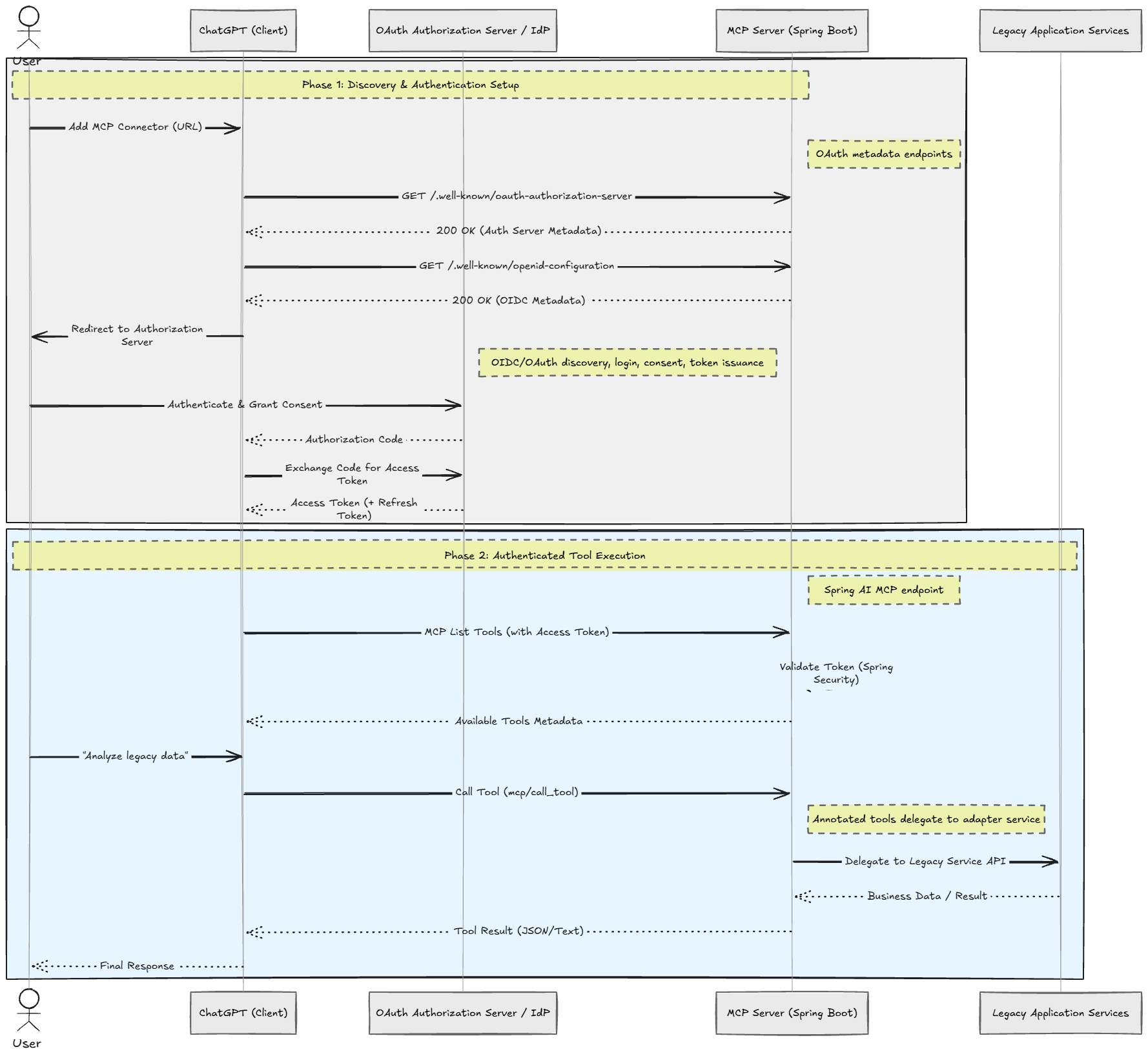
ChatGPT first discovers the OAuth metadata exposed by the MCP server, authenticates against the authorization server, and only then starts making authenticated MCP tool calls into the legacy application.
Request flow
The client connects to the remote MCP endpoint at /mcp.
During setup, ChatGPT probes the OAuth metadata endpoints and follows the advertised authorization server configuration.
After login, ChatGPT discovers the MCP tools and optional widget resource.
A tool call hits the MCP tools class, which forwards to the adapter service.
The adapter service resolves the current user, checks permissions, and calls the existing legacy services.
Results come back as structured MCP responses, and in the file-download case, as an embedded file resource that the chat client can present directly.
Why the adapter layer works well in a legacy codebase
The best thing about this design is what it does not do.
It does not:
- Rebuild domain logic in AI-specific classes
- Expose raw database operations as tools
- Invent a second authentication or authorization path
- Force the MCP layer to own storage, workflow, or processing
Instead, it gives the legacy app a new interface.
That keeps the migration surface small. The MCP code is mostly orchestration, metadata, and translation. The business rules stay where they already live.
Tradeoffs
Tool-friendly APIs are not always the same as REST-friendly APIs
A legacy backend often exposes low-level controllers or request models that make sense for its web app. LLM tools need higher-level actions with cleaner inputs. This pattern solves that by building a separate MCP-facing adapter layer instead of exposing the existing controllers directly.
That adds code, but it keeps the tool contract much cleaner.
Target resolution is intentionally opinionated
The upload flow can resolve a destination by ID, name, or a single obvious default. If multiple destinations match, it should fail and ask for more specificity.
That is a good tradeoff for chat. Silent guessing would be worse.
Widgets improve usability, but add another surface to maintain
The embedded dashboard makes the workflow much easier than raw chat commands. The cost is that the MCP server now owns a small HTML application and the metadata that binds it into ChatGPT.
For many legacy systems, that is still worth it. A tiny widget is much cheaper than redesigning the whole product for chat.
OAuth metadata is easy to underestimate
Most teams assume that "we already use OAuth" means the MCP part will be trivial. In practice, the discovery endpoints and public URL correctness are where many integrations break first, especially outside local development.
What to test
The tests in an MCP module should focus on the integration seams, not just happy-path business behavior.
They should verify that:
- Deprecated or unsafe tools are not exposed
- File-upload tools advertise the correct chat file parameter metadata
- Dashboard tools advertise the expected widget template
- Only the intended widget resources are exposed
- Unsupported file types are rejected
- Ambiguous upload targets fail clearly
- Protected-resource metadata points to the right authorization server
That is the right testing strategy for an MCP adapter. The risky parts are discoverability, metadata shape, auth wiring, and input normalization.
Trying it on dev
The dev MCP server is available at:
https://your-deployed-app.domain/mcp
To connect it in ChatGPT:
Open ChatGPT and go to Settings, then Connectors, then New App.
Enter any name and description you want.
Set the server URL to https://your-deployed-app.domain/mcp.
Choose OAuth authentication.
Under Advanced OAuth settings, choose "User-Defined OAuth Client".
Fill in the OAuth client ID and client secret from your identity provider client, and set the token endpoint auth method to client_secret_basic.
Finish the connection. The available tools should appear and become callable from chat.
Takeaways
If you want to turn a legacy Spring Boot application into an LLM app, you usually do not need a rewrite. You need an adapter.
In this pattern, that adapter has a clear shape:
- Spring AI MCP annotations expose stable tools
- A thin service layer maps those tools onto existing application services
- A dedicated controller serves the OAuth discovery documents remote MCP clients expect
- A small widget resource covers the parts of the workflow that are awkward in plain chat
- Tests lock down metadata, auth wiring, and file-handling behavior
That pattern is reusable well beyond document workflows. If your legacy app already has useful operations and reliable permissions, MCP is mostly a packaging problem. Solve the packaging carefully, and the old system becomes a usable LLM surface without giving up the code you already trust.